Sony BDP-N460 Network Blu-ray Disc Player Review
By Greg Robinson
Edited by Chris Boylan
BDP-N460 Review
Nuthin but 'Net
With HD DVD now a distant memory and flat panel HDTVs priced lower than ever, this holiday season is poised to be the strongest one yet for the high definition Blu-ray Disc format. As was the case with DVD, $200 seems to be the decision-making price point for fence-sitting consumers who have been watching player prices steadily fall. With Black Friday freshly behind us, there is now available a plethora of sub-$200 players, including Sony's newest model, the BDP-N460 Network Blu-ray Disc Player. (The BDP-N460 lists at $249 but its street price at the time of this writing was just under $200.)
Like a growing number of its competitors, Sony is now in the Netflix streaming business. The BDP-N460 represents Sony's first Netflix-capable Blu-ray Disc player - and that's in addition to its Amazon Video On-Demand, YouTube and other internet streaming capabilities. With its claims of speedy boot-up and load times, Sony's heralded Xross Media Bar GUI and long overdue streaming functionality, the BDP-N460 certainly seems to be the standalone Blu-ray player Sony fans have been clamoring for. But was it worth the wait? The short answer: yes and no.

The unit's silver front panel buttons could use an upgrade.
Recession WoesThe BDP-N460 is a fairly attractive player with a solid front panel that flips down for disc insertion and removal. It's an elegant design but the silver power and eject buttons are terrible; they're too thin, they feel chintzy and they lack a satisfying tactile response when pushed. Surveying the rear panel, all looks good until we come to the USB port. And now, if you'll permit me, I need to drag out my soap box...
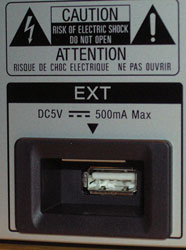
WTF?
The BDP-N460 is a Profile 2.0-"compatible" player. This essentially means that it can take full advantage of advanced Blu-ray features such as BD-LIVE, but only if you plug in a USB flash memory stick. Since the BDP-N460 lacks on-board memory, you're forced to use the rear panel USB port. (There is also a front panel USB port, but bizarrely it can only be used for viewing pictures.) Apparently designed to force (err, "encourage") consumers to buy Sony brand flash memory, Sony has recessed the rear USB port within a plastic pocket that provides only minimal clearance on either side. This means that only straight, narrow USB sticks will work with the BDP-N460. Granted, most USB sticks are straight and narrow, but I had at least one in my drawer that failed to fit properly due to the recessed port.
You don't have to use a Sony-branded memory stick with the BDP-N460, but you will have to carefully consider your stick's dimensions to ensure that it will will fit within the USB cubby hole. A quick search on Amazon revealed that there are numerous 2GB and 4GB USB sticks selling for under $10. This begs a question: How hard would it have been for Sony to simply put even 1GB of on-board memory inside the player, thereby completely eliminating consumer confusion and frustration? The answer: not very. How many shoppers will drop $200 on this player and bring it home, only to find out they need to go back to the store and buy a $10 accessory before they can play with the next-gen features of Blu-ray? And if making life easier for the consumer is just out of the question for an entry level Blu-ray player, at least give us a flush-mounted USB port that will accept any old USB stick. Grr. OK, I'm putting away the soap box.
Remote, Control
While unboxing the BDP-N460, it occurred to me that it's somewhat frightening how the term "firmware" has become a household name. Before you can even get to the BDP-N460 Owner's Manual, you're greeted with a pink sheet of paper talking about the importance of keeping the player's firmware up to date and Sony's various options for helping you do so. These options include a direct ethernet connection to the player, downloading a file off the internet for making your own update disk, or having a disk(s) mailed to you by Sony.
As someone who's "in the business," I am fully aware of the fact that the Blu-ray format is still evolving. However, we're coming up on Blu-ray's fourth birthday soon. At this point, it sure would be nice if consumers didn't have to worry about new discs potentially not playing in their machines. Mind you, this isn't a knock against the BDP-N460, as it's no different than any other Blu-ray player in this regard. But Sony's pink ditto did made me think that if my parents encountered this page, they'd read it, get a bit nervous and ultimately call me for advice and an explanation - and I'm sure they're not alone.
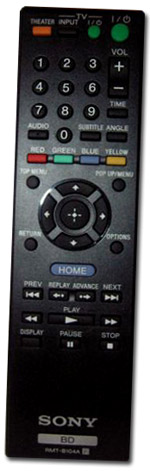
The remote control supplied with the BDP-N460 is your basic, non-backlit Blu-ray remote. For my large hands I found it to be a tad on the small side but others may disagree. The cursor pad and basic control buttons had a solid feel to them and both range and off-axis response seemed pretty good.
After powering up the BDP-N460, I ran through Sony's "Easy Setup" wizard and I successfully achieved working picture and sound in short order. During the setup, there's an option that allows for quicker boot and shutdown times (called, aptly enough "Quick Start Mode"). This increases power consumption of the unit but man is it nice. Engaging this option brings the BDP-N460 online and ready in 4-5 seconds - about 16 seconds faster than in regular mode. And I observed the same times for shutdown. If Blu-ray keeps streamlining like this, it may one day be as fast as DVD!
As is the case with most of Sony's video products these days, the BDP-N460 uses Sony's "Xross Media Bar" as its graphical menu interface. This column-based approach to menu design works fairly well, but it's sometimes frustrating when you can't see everything that a menu contains unless you scroll through it. Also, for some strange reason Sony chose to co-mingle the Blu-ray "play what's in the tray" icon with the laundry list of Internet video "channels" provided by the BDP-N460. This list is rather long and makes for a lot of visual noise that most times, I'd rather not look at. Ideally, I'd like to see the Internet Video channels get moved over to the adjacent "Network" column/menu, making for a cleaner and simpler experience during day-to-day disc playback. And it would makes sense too, since the globe icon which represents the Network menu, lights up on the unit's front panel whenever you engage one of the online video channels.
Bravia Internet Video
Like my recent review of LG's 42LH50 HDTV, there's just a ton of stuff you can watch with the BDP-N460 even if you don't have a Blu-ray Disc on hand. That's because, like the 42LH50, Sony's BDP-N460 is an internet-powered device capable of delivering content from the likes of Netflix, Amazon Video On-Demand, YouTube, Slacker, Crackle, eHow.com and loads more.
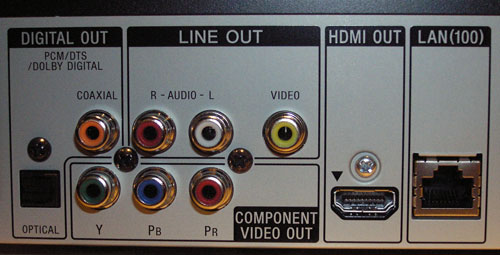
Wireless bridge or no, you'll be needing that LAN port.
It should be noted that the BDP-N460 lacks built-in wireless networking capability (WiFi). It can be used "plug and play" with Cisco's
WET610N Wireless-N Ethernet Bridge, but since buying one of those would add about $80 to the price tag, we're not sure this will be the most attractive option for most shoppers. Again, to be fair, there are no Blu-ray players in this price range that offer built-in WiFi. LG's BD390, Samsung's
BD-P3600 and Sony's own BDP-S560 all sell for significantly more than the BDP-N460. In fact, even more expensive players like the OPPO BDP-83 ($499.99) also lack WiFi. Sony is most likely trying to contain costs here in order to reach a price point.
An alternative to wireless would be to use a Powerline adapter which uses your home's electrical wiring to deliver a network connection from your office router to your home theater or living room's power outlets. However, those aren't particularly cheap either so in the end you may be better off figuring out how you can fish a network cable from your home office to your living room A/V rack. With TV's, Blu-ray players and satellite receivers all leveraging the internet these days, a living room ethernet hub with a hard wire connection makes a lot of sense.
Unlike other internet-powered video devices I've used (such as the aforementioned 42LH50 and LG's BD370 Blu-ray player), Sony adds a frustrating middle layer between the player and the various vendor activation sites. Before you can activate Netflix Watch Instantly or Amazon Video On-Demand on the BDP-N460, you must first register your Blu-ray player at Sony's "Essentials" web site. This is a similar process to the Netflix activation, involving a player-generated unique code that you must enter on the web site and the player is then unlocked to use the "Enhanced Features." Although I can't blame Sony for wanting to know how many people are using the player as an internet device, this extra registration layer makes an already cumbersome activation process that much more so.
As for Netflix, the BDP-N460 presents a new and unique interface for browsing your Watch Instantly queue and I actually prefer it to the one we've seen on most Netflix devices thus far. Instead of one horizontal "coverflow"-esque row of titles, the BDP-N460 uses a paginated grid system that allows you to see 18 titles on the screen at one time. You can use the cursor pad to move up/down/left/right within the grid and this results in quicker navigation and easier browsing of your queue. Streamed titles looked about the same as I've seen on other Netflix devices, which is to say, pretty darn good for free, instant viewing satisfaction.
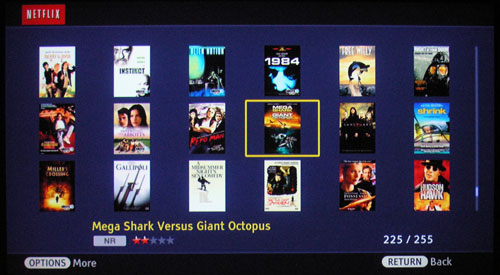
Netflix - 18 titles at a time!
Oh, and one last note about this Sony's internet content.
Slacker internet radio... ROCKS! I almost missed it during my initial testing, since the icon is on the unit's "Music" menu (along with streamable NPR). Much like Pandora, Slacker lets you listen to largely commercial-free music and the BDP-N460 gives you a great interface for browsing. Slacker is a huge asset for the BDP-N460.
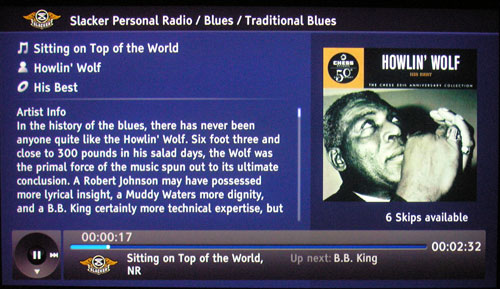
Being a Slacker never felt (or sounded) so good.
Who Ya Gonna Call?Amazon Video On-Demand was the Internet service I had the most problems with on the Sony player. Getting the service activated took several minutes because it didn't seem to realize that I had already registered the player on Sony's Essentials site. After a few browser and player restarts it finally caught on to the fact that I was already registered and life got better. The bigger issue, however, was that "My Video Library" on Amazon.com, which contains Season One of "Warehouse 13" and several episodes of the recently-canceled "Defying Gravity" - both of which appear and play fine at Amazon.com - refused to appear on the BDP-N460. Whenever I clicked on "My Library" it told me that I had nothing to play. Grr.
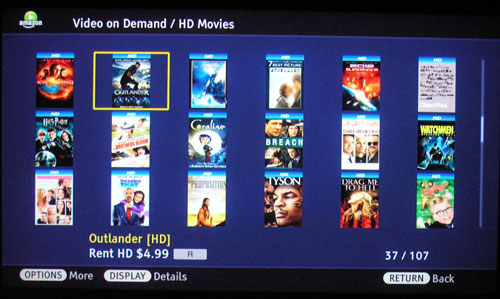
Amazon HD movie rentals
The unavailability of my already-owned Amazon content gave rise to a question: who do I contact for support in this matter? Amazon or Sony? The Sony Essentials site has a support ticketing system where you input the 3rd party service provider from a drop-down list (Amazon in this case) and describe your issue. Using this form generated an automated email response from Sony that implied they were handing the issue off to Amazon. As of this writing, I have yet to hear back on the subject of my missing content. On the bright side, a new rental of Sony's
Ghostbusters spooled up quickly and looked decent enough once playback started.
Core CompetenciesOne mustn't forget that at the end of the day the BDP-N460 is, above all else, a Blu-ray Disc and DVD player. Netflix and Amazon streaming is fine but when you want to get down to business and watch a film the way it was meant to be seen, nothing beats a 1080p high definition Blu-ray Disc. Blu-ray playback, the BDP-N460's core competency, is definitely one of its strong suits. Discs load quickly and 1080p video over HDMI looks every bit as good as it should.
After popping in the HQV Benchmark DVD, I set the player's HDMI output resolution to 1080p to ensure I was testing the player's processing and not that of my projector. The results were solid overall. The color bars pattern revealed a pulsating flicker at marker #2 once the arrows appeared, but the unit did just fine with the two jaggies tests. Jaggies Test #2 revealed minor movement on the very edges of the third bar, but it was definitely a Pass. The flag test showed some stair-stepping on Old Glory but the adjacent bricks looked good with zero artifacting. Nothing noteworthy was observed during the video noise tests but the BDP-N460 did an exceptional job with the
Super Speedway sequence, immediately locking down the 3:2 cadence.
Like many Blu-ray players, the BDP-N460 does not output lossless audio tracks via bitstream by default. It will do so, but you first need to change the "BD Audio" setting to "Direct" from its default value of "Mix." Once I did so, my Onkyo TX-SR805 receiver gave me the visual confirmation that it was receiving and decoding Dolby TrueHD and DTS-HD Master Audio. The BDP-N460 also features onboard decoding for both of those formats if you prefer to use PCM output.
Was That Fast? I Thought That Was Fast.
Before settling in to enjoy a few movies, I first got out my trusty stopwatch and conducted our three load time speed tests. The test subjects included: a standard DVD (Gladiator), an early non-Java Blu-ray Disc (Sony's Underworld: Evolution - released on the same day as Sony's Hitch, our usual candidate) and finally a more recent, Java-enhanced Blu-ray Disc (Pirates of the Caribbean: Curse of the Black Pearl). For each disc, I started with the unit on and the tray extended; I hit play on the remote and timed how long before disc-specific content (usually a studio logo) appeared.
The Gladiator DVD presented its soundtrack menu in 13 seconds flat. Impressive! Underworld 2 displayed the Sony Pictures Home Entertainment logo in a nimble 20 seconds. And last but not least, Pirates' gold coin stopped spinning and gave way to the Disney logo after 34 seconds - exactly half the time needed by the recently-reviewed Pioneer BDP-320 and 3 seconds faster than the Oppo BDP-83. Bottom line: this is one of the fastest Blu-ray players I've seen yet.
To wrap things up, I spent some time actually watching that Gladiator DVD and was reminded of how great a movie it is. (I can't wait to see what Ridley and Russell deliver with their upcoming Robin Hood film.) Gladiator's overhead pan of Rome looked sharp and stable and no major artifacts or red flags presented during playback of several key sequences. The image wasn't as sharp as I'd like, but I'd be lying if I didn't admit to being suddenly spoiled by the splendor of Blu-ray.
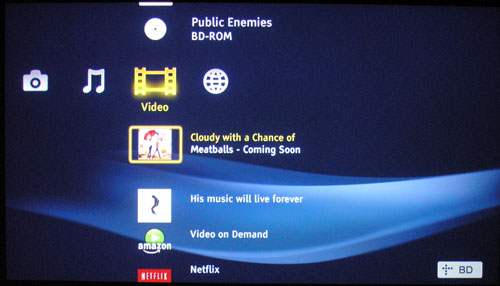
The Video menu can get a little messy.
Switching over to Universal's new Blu-ray edition of Michael Mann's
Public Enemies, the BDP-N460 took 44 seconds before presenting the disc's main menu. That's slower than
Pirates, but still respectable. Mann's glorious set design and the film's impeccable assortment of early 30's costumes looked truly splendid by way of the BDP-N460, with crisp detail and a warm, natural palette. The first half hour of
Public Enemies suffers from a few dialogue normalization issues, but these also presented on my Panasonic player. Once the soundtrack found its footing, the DTS-HD Master Audio mix rendered rather impressively, thanks in large part to the thunderous action of Johnny Depp's "Tommy" gun.
Turn Ons
- Fast boot and shutdown times; blazing fast disc load times
- Robust internet streaming capabilities - including Netflix & Amazon
- Improved Netflix Watch Instantly queue browsing
Turn Offs
- No onboard memory for BD-LIVE
- Recessed USB port out back is destined to annoy
- Video menu comingles disc playback with Internet video channels
- Lacks multi-channel analog outputs
Final Thoughts
The BDP-N460 gets a lot of things right but it's not the slam dunk I was hoping for from Sony. Speedy boot-up and shutdown times are a huge plus and I was largely impressed with the unit's internet streaming capabilities. However, the unit's lack of onboard memory and its recessed, inconvenient USB port feels like poke in the eye. Not helping things are the chintzy front panel buttons and a mediocre, non-backlit remote.
In the end, my issues with the BDP-N460 are largely ergonomic and they shouldn't overshadow the most important fact of all: the BDP-N460 is Sony's most affordable, full-featured Blu-ray player to date. And when you consider the unit's solid audio and video performance coupled with its robust internet streaming capabilities, the BDP-N460 is a worthy contender for your hard-earned money.
BDP-N460 Features and Specifications:
- Video Output: up to 1920x1080 (1080p), 1080p/60 for DVDs, 1080p/60 or 1080p/24 for Blu-ray
- Deep Color Support: Up to 12-bit
- x.v.Color Support
- BRAVIA Sync and "One Touch Play" when connected to a compatible Sony Brava HDTV via HDMI
- Noise Reduction
- BD-Live / Profile 2.0 -Compatible (USB memory required)
- Internal Audio Decoders: internal decoding of Dolby Digital Plus, Dolby TrueHD, DTS-HD High Resolution, and DTS-HD Master Audio to PCM or analog output
- Video outputs: HDMI, component, composite
- Audio outputs: HDMI, optical (S/PDIF), coaxial digital, analog (2-ch)
- Other terminals: Ethernet (RF-45), USB (front and rear)
- Power Requirements: 120 V, 60 Hz
- Weight: 4.6 lbs (2.1 kg)
- Dimensions: W x H x D: 16.9 x 2.2 x 8.1 inches (430 x 56 x 207 mm)
- MSRP: $249
Manufacturer's Contact Information:
Sony Electronics Inc
16530 Via Esprillo
San Diego, CA 92127
Phone: 877-865-7669
Web: SonyStyle.com