Slim Devices' Transporter from Logitech Review
By Joe Lozito
Stream Me Up, Scotty!
At the Home Entertainment 2007 show in New York City, we stopped in for a visit with our old friends from Logitech. Loyal
Big Picture Big Sound readers will recall our raves for Logitech's
Harmony 880 and
Harmony 890 Universal Remotes. At the show, our eyes were immediately drawn to
Slim Devices' Transporter™ from Logitech - and not just because of the obvious "Star Trek" reference. As the name implies, the Transporter is originally from Slim Devices which Logitech acquired in 2006 and it represents Logitech's first network music player designed to appeal specifically to audiophiles.
The Transporter is not just a step up from Logitech's SqueezeBox player, it's a step in a completely different direction. Its undeniably sexy chassis (in silver or black) is perfect for the high-end aesthetic for which it strives. The unit connects to your stereo via digital or analog outputs, and connects to your music server wirelessly or via Ethernet.
The Transporter hardware itself is simply a thin-client which listens to the network. The SlimServer software must be installed on your music server. Like Logitech's universal remotes, the Transporter's software does most of the heavy-lifting, and it's supported on a variety of O/Ss including Windows, Mac, Linux and Solaris. The software is used to decode and stream various music formats in one of the unit's native formats (wav, flac, ogg, mp3). You can browse through your music collection via the unit's display menu, which has a foldering system similar to those omnipresent iPod menus.

Front in Black
Oh, and did we mention the software is open source? Several plug-ins have already been written, including the very cool "Lazy Search" which allows you to type the name of a song/artist a la SMS T9 messaging. You can also download firmware upgrades via the Internet and the software will automatically upgrade the firmware on the Transporter.
Naturally, we had to get our hands on one of these to see if the product lived up to the promise. And so, without further ado...
The Setup
The hardware can be added to your audio infrastructure in a jiffy, just choose from one of the multitude of input/output connections. In my case, I experimented with both the standard fiberoptic digital outputs and the analog RCA outputs, preferring the sound from the analog outputs as it allowed the Transporter to convert the digital signal to analog using its internal DAC and high quality analog stage. Thanks to the wireless networking capability of the Transporter, I didn't need any other cables.
Setting up the connection between the Transporter and my music network was astoundingly fast. Just scroll to the "Set Up Networking" option on the Transporter's menu and select a wired or wireless network. After choosing "Wired" it immediately detected my local SSID. I set it to obtain an IP address automatically and I was connected. Since the Transporter has a MAC address, I was able to allow it through our router's MAC address filtering, and I was up and running in no time.
At this point, the Transporter scanned my local network for a SlimServer. Oops, guess I should have installed the software first. OK, down to business. The manual instructs you to go to the website to download the software. After doing that, the install completed with one error (something about a perl dll not loading).
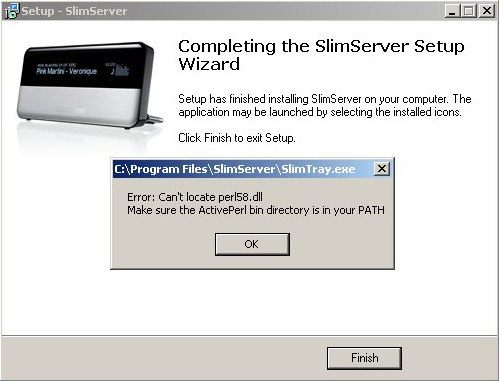
I chose to ignore this and hope it goes away
I cavalierly decided to ignore the error and restart the PC. Voila, I was up and running.
The SlimServer can be set to load on startup, and (on PCs) it will run as an icon in your system tray.
Once the server is up and running, the Transporter can connect to your music library. First, however, the SlimServer software has to
scan and catalog your library. I pointed it at my iTunes library and waited. And waited. Now, to be fair, it had to scan upwards of 80GB worth of (legally-acquired) music, so I guess I can allow it the few hours it took. The good news is, when you add new songs to your library and restart the SlimServer (or click "rescan") it will add the new songs in no time at all.
Note: the SlimServer doesn't support m4p files.
Among the cool features of SlimServer is the ability to import iTunes playlists. This becomes a lifesaver when you start to actually play music. Which brings us to...
Searching
Now that the Transporter was connected to my network and the SlimServer had cataloged my music library, I was ready to play (to be fair, you can start playing music while the library scan is going on, but I figured I'd wait for it to finish). Here's where the Transporter left me cold: picking a song.
There are three ways to explore your music collection with the Transporter. The most common is via the remote control and the Transporter's on-screen display. You can also use the controls on the Transporter itself, and it's worth mentioning the extremely cool "force-feedback" style knob at the center of the unit. You rotate this central knob to scroll through menus, then you push it to make a selection. Very neat - if you don't mind sitting next to the Transporter. The remote control mimics this functionality well via an up/down/left/right pad (more on the remote later). Lastly, you can also use the SlimServer's browser interface to search for and play songs on your Transporter.
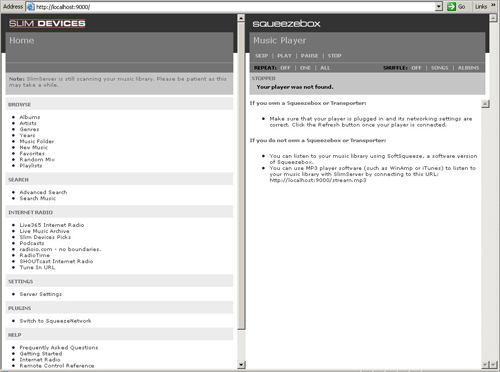
The SlimServer Browser interface
Since the Transporter's display has effectively one line for text, it allows you to view only one artist/album/song at a time, so scrolling and picking music on a whim is out of the question (unless your library is very small or
very well-organized). The SlimServer's built-in Search function is useful, allowing you to type in and search by one or more letters but the "Lazy Search" plug-in I mentioned earlier is a must-have. It allows you to type an artist/album/song name as though you were using the SMS T9 functionality found on many cell phones (useful for quick text messaging).
Still, unless you know exactly what song you want to play, searching this way can be a mind-numbing exercise. But that's where playlists come in. Rather than search for single songs, I recommend using the Transporter to play your playlists or let the Transporter be the DJ by slecting "Shuffle" mode ("shuffle by song" or "shuffle by album").
If, however, you're looking for a specific song, go to your music server and use the SlimServer's browser interface. First of all, it's exceedingly cool to be able to control your Transporter wirelessly via the browser. But secondly, having a keyboard and mouse available to search for music is a must. One note: be careful that you don't accidentally switch to the Slim Network while listening to your local music library - your listeners might be annoyed by the abrupt end to your audio track.
Play on, playa
OK, enough searching, can we play something please? To put the Transporter through its paces I decided to play a selection of "Genre" playlists (Hip Hop, Classical, Rock, Jazz and Early 80s). First, I played the song via a direct connection between my music server's audio card and the stereo (bypassing the Transporter entirely). Then I switched to the SlimServer/Transporter combo and listened for a difference.
I can say, across the board, that the Transporter's sound quality was outstanding. I left the volume on the Transporter at about 3/4 and varied the dbs of my Onkyo receiver. The sound was crystal clear even as I blasted it. The Transporter's advanced digital and analog components brought even my more heavily compressed MP3s easily up to what I consider "CD quality" and allowed losslessly-encoded tracks to really shine. It beats playing simple MP3s through iTunes (or some similar music player) through the soundcard in my laptop hands-down.
The funk of the Red Hot Chili Peppers, the crescendo of "Pagliacci," the grunge of Soundgarden and the smooth lines of Miles Davis were all spectacular. Plus, those digitally-simulated VU meters are (pardon me, Paris) hot. I would not consider myself an "audiophile" per se, but living with the Transporter for a few weeks might just bring me around.
Extras, Extras! Read all about it
As you've read above, we've been using the Transporter, by and large, as a streaming music player. It's important to note that it can also serve as a standalone DAC (digital-to-analog converter). Simply connect your CD player or other digital source via the Transporter's extensive inputs - AES/EBU, S/PDIF coax (RCA and BNC), or TOSLINK - and use the Transporter's built-in DAC to pipe the music into your receiver (or preamp). It gives old CDs new life and may reveal details in the original recordings that you never knew were there.

Back in Black
You can also use the Transporter to connect to the Squeeze Network with Rhapsody Music Service so you can play music directly from your Rhapsody account without using a PC. Very cool. The Squeeze Network also supports other services like Live365, RadioIO and Pandora (which allows you to rate songs as they play).
The Transporter has a few fun bells-and-whistles like an Alarm Clock, Graphic Visualizer and Screensaver. But my favorite was the support of RSS news feeds. Via the browser interface, you can assign a selection of RSS feeds to your SlimServer. Then, from the Transporter unit, you can select "RSS News Ticker" to view the list of items in the feed. A little hokey, yes - particularly given the single-line display capability - but cool nonetheless.
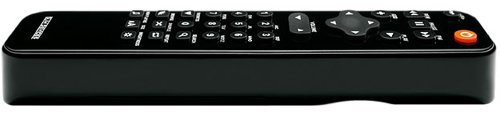
Another cool Logitech remote
And finally a word about the remote control. Now, Logitech is no stranger to excellent remotes (sorry, I know, enough about the Harmony remote) but it's a kind of poetic happenstance that Logitech acquired Slim Devices and the Transporter happens to have a really cool remote. It's simple up/down/left/right pad makes navigation easy, but it's the subtle backlight (which turns on any time you hit a button) that sold me. What can I say? It's the little things.
Final Thoughts
Overall, the Transporter is a very impressive entry from Logitech into the high-end audio field. There are still legions of passionate audiophiles around the world who only grudgingly accept CDs as "passable" in sound quality (as opposed to vinyl LPs), and these folks wouldn't be caught dead listening to a lossy compressed MP3 file, played through a cheap sound card. With the Transporter's support for multiple lossless compression codecs, and its ultra-high quality digital and analog components, audiophiles now have the option of ripping their entire catalog of CDs to a computer gaining instant access to any disc or song in their collection from the comfort of their couch or easy chair, without having to sacrifice one bit of sound quality.
But even so, the Transporter serves a fairly niche market. And at a MSRP of $1,999, it's not what most people would call a bargain. While I can't recommend the Transporter to the casual user, tempted audiophiles - with a need or desire to bridge their digital music collection to their HiFi rig (and with well-organized playlists) - won't be disappointed.
Product Specifications and System Requirements:
System Requirements:
- Ethernet or Wi-Fi (802.11x) home network (access point required for Wi-Fi)
- PC: Windows® 2000, Windows® XP, Windows Vista™
- Mac: Mac OS® X (10.3.5 or later)
- Linux/BSD/Solaris
- Perl (5.8.3 or later)
Technical Specifications:
- DAC: AKM AK4396 multibit sigma-delta D/A, 120 dB dynamic range, 120 dB SNR (A-weighted), -106 dB THD+N
- Digital outputs: 15 picoseconds intrinsic jitter (standard deviation), coax, optical, BNC S/PDIF, and balanced AES/EBU
- Digital inputs: Coax, optical, BNC S/PDIF, and balanced AES/EBU inputs that can be used to drive the DAC, network streaming, or pass-through
- Word clock input: Allows synchronization to an external clock source
- Display: Dual 320 x 32 grayscale vacuum fluorescent displays with multiple text, spectrum analyzer, and VU views
- CPU: 325 MIPS eight-way multithreaded, 8 MB audio buffer and SlimDSP™
- Network: True 802.11g wireless, 10/100Mbps Ethernet
- Decoders: WAV, AIFF, MP3, WMA, FLAC with 24-bit resolution, and 44.1, 48, and 96 kHz sample rates
- Communications: TCP/IP control, infrared input, infrared output, RS-232
Rack-mount brackets: Optional
- Weight: 6 kg (13 lbs)
- Power: Autoranging linear power supply 100-240 V, 50-60 Hz, 10 watts
- Remote control: Custom, backlit, 32-key infrared remote
- Dimensions (H x W x D): 17" x 3" x 12.25" (433mm x 72mm x 311mm)
Company Information:
Slim Devices, Inc. (A Division of Logitech)
455 National Avenue
Mountain View, CA 94043
+1 (650) 210-9400
Website:
www.slimdevices.com


