Logitech Harmony 670 Advanced Universal Remote Review
By Cliff Darroch
A Universal Joy To Use
When I was offered the opportunity to review a sample of the (at the time) newly released Logitech Harmony 670 remote control, I took a quick scan of any other available reviews. Interestingly enough, many had been written with fairly definitive statements on functionality, interactivity and overall suitability, based on a review sample which could only have been in their keen hands for a few weeks at most.
I'm not sure about you, but the last piece of electronic equipment I bought, had barely been broken in within a couple of weeks, let alone become totally familiar to me. I decided at that point that an extended usage would give me more complete perspective. A few months have passed, and the feedback from all family members has been positive. Even my Mother-In-Law can watch and control the TV by herself
(she typically has trouble turning on a receiver!). This is not an easy feat considering that to watch the TV, 3 different pieces of equipment have to be activated and correctly set.
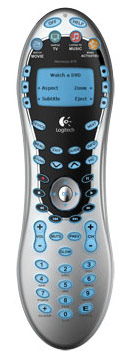
The Harmony Model 670 Universal Remote.
Me And My Harmonies
I've been a long time user of Harmony remotes to control the various Home Theater components that I have owned over the years. My first was a Harmony 768, elongated oval shaped remote with a limited number of buttons, a side wheel similar to a blackberry and no backlighting. It was great, but not all that easy to program even with the web-based database of codes and functions. That remote lasted a number of years, but finally succumbed to a nasty fall from my 8 year old son's hands.
The next Harmony I purchased was a 628. This budget model was acquired for a song from the local Costco, and handled all that I threw at it with relative ease. It was the easier to hold pinched shape and had a much better layout than the 768, but had the most interesting and annoying layout of transport controls I've ever used (see photo below, Blue Unit). As a PVR/DVR owner, the lack of dedicated PVR/DVR type keys made me want more. By this time, the web interface was made easier to use, although not perfect. That leads me to the 670...
A Better Remote Is More Than The Sum Of All Its Parts
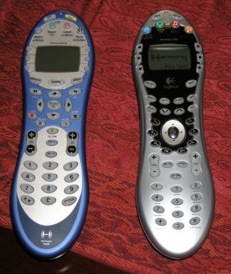
Old vs. New - the Harmony 628 and new 670.
The 670 is another pinched oval shaped remote with a monochrome screen and backlit buttons. The buttons are rubber with a plastic coating which enhances the feel and the visibility in the backlit mode. As can be seen from the above picture (670 on right) the number of hard buttons has been increased from the earlier model to include dedicated PVR controls. Surprisingly though, no dedicated "PVR" button has been provided (a button which is essential for PVRs on the DishNet and ExpressVu systems). With that in mind, adding a PVR soft button (available on the display screen) was an easy task via the very easy to use PC and web-based configuration utility.
Setup and programming of the remote was about as simple as installing an application on a PC - a good one... one that doesn't crash or cause memory contention - then answering some simple questions about the various components in my home theater system and how they all fit together. The software CD virtually runs itself (it has an auto-run facility) and my installation went without any hiccups.
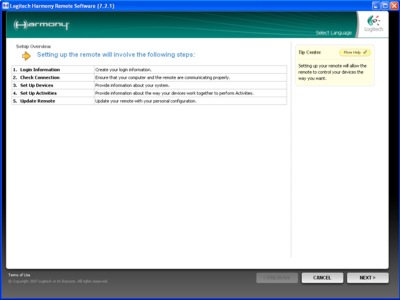
Simple Wizard-Driven Configurator
After installation of the client software, you set up a User ID and Password of your choice and start to define the Devices (e.g., TV, DVD, receiver) and Activities ("Watch TV," "Watch Movie") you want to control. Depending on how many components are in your system, and how fancy you want to get, this process might take as little as 20 minutes, or as much as an hour. This step, although not complicated, does require a certain minimum comfort level with PCs, Web-based forms and AV terms.
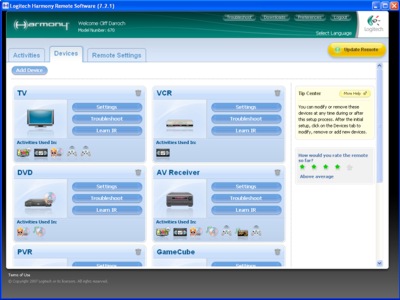
All managed devices displayed on one screen
After all of your components have been added and activities defined, additional configuration options can be chosen in order to personalize the global settings of the remote. Let's say you want your "Aspect" button from your TV remote to appear on the main LCD screen of the 670 for all activities that include the TV. Or you want to rename your Denon receiver to "Reggie," (allo, Reggie!), you can do this in the "customize this activity" screens.
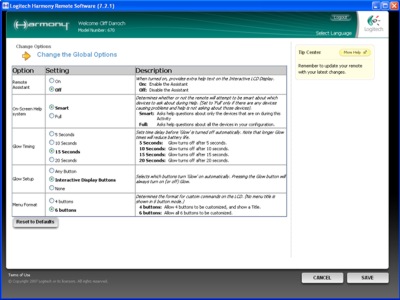
Configuring additional options
You will be prompted to test the remote before finalizing the setup. If all of your equipment has been chosen and configured correctly, you're good to go.
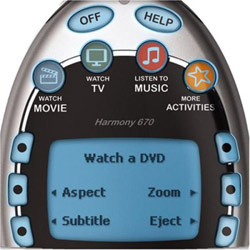
3 common activities (Watch Movie, Watch TV and Listen to Music) get dedicated hard buttons at the top, but you can program many more activities on the LCD screen itself using your own custom text.
Even The Shiniest Have A Little Tarnish
Is the 670 a good remote? YES. Harmony (and now Logitech, after the acquisition) have been building some of the best programmable remotes available on the market for a while now, and the 670 continues that tradition. Is it the best $129 remote on the market? Probably. I have yet to find a remote that is more versatile, user friendly and configurable.
Is the 670 a perfect remote? NO. It would be unfair to leave you with an impression this remote has no faults. I have already addressed my first pet peeve, the lack of a hard PVR Button. But my biggest problem with this remote has to do with the odd layout of the transport buttons on the remote (see picture below). A circular arrangement of transport buttons around a center "OK" button.
I suppose this should make it easier to memorize the position of the various buttons over time (as opposed to a traditional row or two of rectangular buttons right next to each other) but I found the circular layout to be rather odd. The controls are comprehensive (unlike the 628), quite stylish and real estate-efficient, but their identical size and shape makes them difficult to use by feel only, and very easy to "Fat Finger." This is not as major as missing basic functions (again the 628) but one has to try to find areas for improvement.
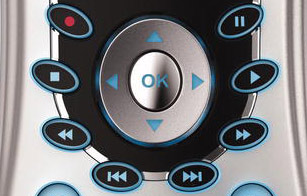
A circular transport layout??
Final Thoughts
I enjoyed my (extended) time with the 670, and my minor gripes were all issues with which I could easily live. Hey, even my mother-in-law liked it (which some would view as a negative, as it's only going to encourage her to spend more time at our house, but I value my life more dearly than to agree with those people in a public forum).
What is the competition for the 670? Other Harmony remotes, specifically the
880 and
890. These bring larger color screens, more programmable activity buttons, rechargeable batteries and RF capabilities (890 only) to the table, as well as a more traditional transport button layout. But they're also significantly more expensive. Ultimately you need to decide whether the upscale features and fancy color screens are worth the additional cost.
Aside from the RF capability of the 890, and the more traditional transport button layout on the 880 and 890, the model 670 controls the same equipment virtually the same way with the same easy-to-use Web-based configuration Wizard and interface. So decide how much you want to spend and rest assured that you'll get your money's worth.
Where to Buy:
Harmony 670 Remote on Amazon.com
In the Box: - Logitech® Harmony® 670 remote control
- USB cable
- Installation CD
- Installation guide
- 4 AAA batteries
- 1-year warranty
System Requirements:
IBM® or compatible PC:
- Microsoft® Windows® 98, 2000, ME or XP
- USB port
- CD-ROM drive
- Internet access
Macintosh® Computer:
- Macintosh® OS X or later
- USB port
- CD-ROM drive
- Internet access
Manufacturer's Contact Information:
Logitech Remote Controls
2355 Skymark Avenue, Suite 200
Mississauga, Ontario L4W 4Y6 Canada
+1 905.273.4571 Main
+1 905.273.9789 Fax
Website:
www.logitech.com/harmony


