Pioneer VSX-1121-K Receiver Review
By Greg Robinson
Edited by Chris Boylan
'Tis Better to Receive
This time of year, it's admirable to put the needs and wants of others ahead of our own. Gift giving can be a wonderful experience and few things top that feeling you get when watching your special someone tear into an official Red Ryder Carbine-Action Two-Hundred-Shot Range Model Air Rifle. All that aside, whoever said "it's better to give than to receive" obviously didn't own Pioneer's VSX-1121-K audio/video receiver (AVR). It may not have a compass in the stock or this thing which tells time, but its ample power output, advanced network capabilities, and integrated Apple AirPlay go a long way towards covering up any minor shortcomings.
Some of you may remember my glowing review of Pioneer's VSX-1020-K from last summer. In it, I described the 2010 model as "the smartest and one of the most affordable full function A/V receivers I've seen yet from the wizards at Pioneer." I stand by that statement, and so it was with great anticipation that I set about exploring the ins and outs of Pioneer's VSX-1121-K, the flagship model in Pioneer's 2011 AVR lineup (before stepping up to Pioneer's ELITE series).
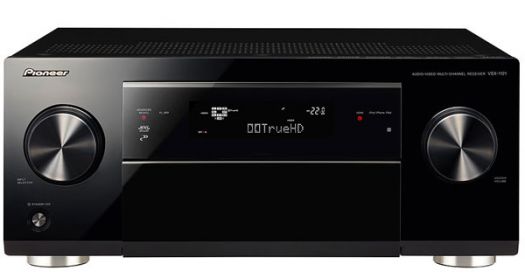
The front panel's hard buttons are neatly concealed by a large, flip-down door.
The Walk-Around
Pioneer's VSX-1121-K is a relatively unassuming black box with an attractive, uncluttered fascia. Unlike the other models in Pioneer's lineup, the VSX-1121-K features a large, flip-down door which neatly conceals all of the front panel's hard buttons (except for Power). The large volume and input selector knobs have a chunky and sturdy feel and offer just the right amount of resistance when being adjusted.
Out back you'll discover that Pioneer has loaded lots of toys and goodies upon this sleigh. From its six 3D-capable HDMI inputs to its Ethernet jack for network media connectivity, the VSX-1121-K has your connection needs covered. Step-up features unique to the VSX-1121-K include the always-welcome detachable power cord, Zone 2 preouts, plus an RS-232C port and two 12-Volt triggers for the custom installation and home automation crowd. Also worth noting is the unit's dual subwoofer outputs. If you're like me, and you're running dual subs for smoother bass repsonse, this will save you from having to hang a Y-splitter off the back.
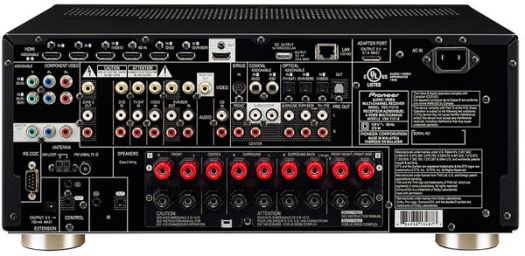
HDMI, Zone 2 pre-outs, and network connectivity highlight the rear panel.
Although the VSX-1121-K provides seven channels of amplification (110 watts x 7), the rear panel features nine sets of speaker binding posts. The last pair is labeled as "Front Height/Front Wide" and can be used in lieu of Surround Back channels. The binding posts themselves are on the chintzy side; they lack the reassuring heft of those found on more upscale AVRs, but they get the job done. Save your fingers some grief though and invest in a set of quality banana plugs to make your connections quick and painless.
Remote, Control
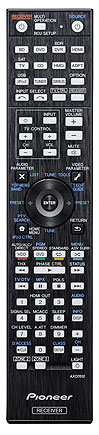
Too many tiny buttons and poor Volume placement... boo.
Pioneer's included remote control is partially backlit and features many, many tiny buttons - not all of them in the places I would prefer them to be. The volume rocker is on the small side and its unusual placement makes it sometimes hard to find in the dark. Unfortunately, the backlight is only triggered when you push the "Light" button in the lower-right corner of the remote - another awkward location. In the end, this Pioneer remote is little more than serviceable; kudos for the direct source selection buttons, but its ergonomics could stand some improvement.
Pioneer describes this receiver's on-screen menu system as a "full color Graphical User Interface." Although this may bring to mind a colorful, pretty GUI loaded with icons and style, keep your expectations in check. Like many receivers, this Pioneer's GUI is a pretty basic affair and the few images you'll encounter are primarily gray. Generally speaking, Pioneer's approach to GUI design on their AVRs is somewhat less than intuitive, with general system setup items (e.g. Speaker Size) taking a back seat to "Advanced MCACC," Pioneer's room correction and automated calibration utility. Once you learn the GUI's quirks, getting around isn't hard, but you're apt to get frustrated once or twice due to its sometimes clunky and slow operation, particularly when giving your inputs custom names.
It's a Set-Up!After making connections to my seven Noble Fidelity L-55 LCR in-wall loudspeakers, and dual Definitive Technology subwoofers, I ran through Pioneer's aforementioned MCACC automated setup utility. The speaker sizes and distances were accurately identified, though I did end up bumping the crossover frequency from 80Hz to 100Hz. I would have preferred the option of making this adjustment on select speakers, but alas Pioneer forces you to choose one frequency which then gets applied to all connected speakers.
Like everything that's electronic these days, the final bit of set-up came from dealing with my home network. After connecting an Ethernet wire to my Cisco Gigabit Switch, the Pioneer quickly established an IP address on my home network and had no trouble receiving music from iTunes on my home PC running elsewhere in my home office - but more on that in a minute.
Also in keeping with everything else these days, the VSX-1121-K required an important firmware update before its integrated Pandora and Rhapsody music services could be used. Unfortunately, that Ethernet jack out back was little help here. Pioneer requires you to download a zip file to your PC, extract its contents to a USB stick, and then insert said USB stick into the unit's front panel USB port. Hopefully this old-school manner of manual updating will soon be replaced by completely automated network delivery. Although, I must say it's a whole lot easier than the old way of bringing or shipping the receiver into the closest regional service center. The update took about ten minutes and went smoothly. When it was done, Pandora and Rhapsody were up and running.
Just Because You Can...
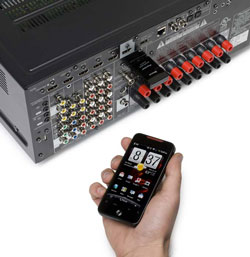
With an optional adapter, the VSX-1121-K can stream Bluetooth content.
...doesn't mean you should. This is particularly true when talking about the VSX-1121-K's network feature set. However, before we get to the not-so-good stuff, let's talk about the great stuff. In a word: AirPlay. There are those of you who will buy this receiver solely for its built-in Apple AirPlay support - and I can't say I blame you. It's awesome. The ability to stream music directly from your computer running iTunes, or your portable iThing... it rocks. One or two clicks (or taps) on your iDevice will instantly beam your music to the VSX-1121-K (to which you can assign a "Friendly Name" (e.g. "Family Room") if you prefer. Sending a music signal via AirPlay will cause the VSX-1121-K to instantly switch to the Home Media Gallery ("H.M.G.") source and your music is audible within ten seconds. Nice.
If I had to nitpick, the only gripe I have with the AirPlay experience on the Pioneer is the lack of an "AirPlay" entry on the H.M.G. menu. If you inadvertently change sources or interrupt the music, you can't easily force the receiver to return to playing AirPlay content. This isn't a big deal though, because simply toggling your speakers at the source (e.g. iTunes) will re-send the signal and you're back in business. Multi-zone users will be thrilled to learn that the H.M.G. source (which includes AirPlay) can be used as a Zone 2 source. Pair this with the VSX-1121-K's Zone 2 preouts on the rear panel, and you can imagine the possibilities when it comes to whole house audio.
Now that the AirPlay praise is out of the way, let's get back to the not-so-good. Selecting the Pioneer's H.M.G. source provides you with one-stop shopping for all of your home network- and Internet-sourced media. The problem? It ain't pretty. Whether I was navigating the directories on my Netgear ReadyNAS' DLNA music server, or inputting log-in credentials for the receiver's integrated Pandora service, I quickly wanted to pull my hair out. Bland menus, less-than-helpful on-screen help, and the frustrating lack of a keyboard had me reaching for my revolver, but it's important to keep the proper perspective. There are definitely far better, graphically-superior, and more intuitively designed ways of accessing network content. However, I'd rather have clunky, rudimentary implementations of these features than not have them at all.
Now Hear ThisIn terms of surround sound decoding, little has changed since my review of the VSX-1020-K. The VSX-1121-K will decode just about everything you throw at it, including Dolby TrueHD and DTS-HD Master Audio. Video processing comes courtesy of Marvel's QDEO chipset, and it's a step above the so-so Anchor Bay chipset available on lesser models. Standard definition content from sources such as DVD or Netflix won't look leagues better, but there is at least some improvement during the upconversion process. That said, with virtually everything under the sun now available in high definition, this is becoming less and less of an issue for most folks. The main thing you want to know is, how does it sound? In short, the VSX-1121-K sounds quite good.
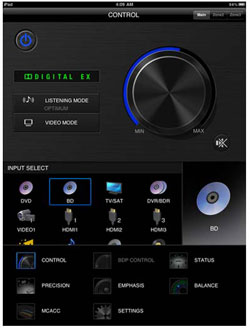
iPad or Android tablet owners will likely want to download Pioneer's free controller app: iControlAV2
To retain the benefits of my MCACC settings and get the most out of my lossless Blu-ray soundtracks, I left the VSX-1121-K in its "Auto Surround" mode for much of my time with it. Watching the breathtaking finale of Pixar's
The Incredibles (starting with "100 Mile Dash"), I was quite impressed with the Pioneer's ability to fill my basement theater with sound, while never seeming hard pressed to do so. Dash's exhilarating run through the forest and over the water exhibited tremendous range and gut-wrenching bass during the robot's rampage in the ensuing chapter. Listening to a Norah Jones SACD on my Oppo BDP-93 yielded a wonderfully airy sound stage and crisp, impressive renderings of Norah's sultry vocals. Oh, Pioneer, we may miss your KURO but thank you for staying active in the audio market.
Turn Ons
- Integrated AirPlay
- Internet radio, Pandora, Rhapsody
- Effective automated calibration
- iControlAV2 controller app (iOS and Android)
Turn Offs
- Limiting subwoofer crossover options
- Clunky and frustrating interface for network media features
- Poorly designed remote
Final Thoughts
There are many audio/video receivers competing for your attention these days. What you need is a distinguishing feature to aid in the decision making. Consequently, the question you need to ask yourself is, "Am I an Apple music person? Is AirPlay very important to me?" If the answer to both of those questions is yes, look no further. The VSX-1121-k offers effortless AirPlay integration coupled with superior sound quality, and connectivity galore. If you can get past some of its ergonomic quirks, there's a lot to like in Pioneer's VSX-1121-K.
Manufacturer's Specs:
Company Contact Information:
Pioneer Electronics (USA)
2265 E. 220th Street
Long Beach, CA 90810
On the web: www.pioneerelectronics.com


