DataColor Releases Pro Version of their SpyderTV Television Calibration Tool
By Chris Boylan
So you've just bought an expensive new top-of-the-line HDTV. It's from a reputable brand, is highly rated by all of the best forums and home theater sites, and it looked pretty good on the showroom floor, too. Plug it in, hook it up and BOOM, disappointment! The colors are off, areas of the screen that should be black are grey, and there's a thin outline around the images. Is it busted? Do you need to box it up and bring it back where you bought it? Probably not. You just need a crash course in video calibration.
Why don't they set it up right at the factory? A good question. But most of the time, the default settings on any TV (high-end or low-end) are made so that the TV will look brighter, hotter and sharper than the competition on the brightly lit showroom floor. These settings usually don't translate well to the more subdued lighting of the home.
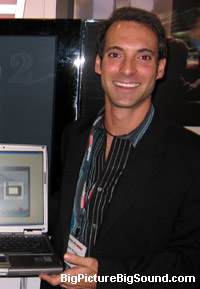
Datacolor's Director of Technology Mark Hunter formally introduces SpyderTV Pro at CEDIA Expo 2006.
To solve this problem, you can a.) hire an ISF-trained technician to calibrate your TV for you, b.) buy or borrow a calibration DVD like "Video Essentials" and make the adjustments by eye or c.) purchase
Datacolor's "SpyderTV" calibration software and colorimeter which will step you through the entire calibration process automatically in about 30 minutes.
The SpyderTV package includes a cute little colorimeter (a device that measures light and color levels) which attaches to your TV screen via suction cups, and plugs into your laptop or PC via USB, where it interacts with datacolor's calibration software package. It also comes with a test pattern DVD that you use to display the appropriate patterns on your screen. The datacolor software measures your screen's output when it displays the various color patterns and tells you how to adjust it so that the readings are as close to possible to the proper NTSC (National Television Standards Committee) settings.
The standard SpyderTV package is pretty good (our writer Cliff Darroch certainly liked it in his
SpyderTV review), but it has some limitations: a.) it cannot be used with front projection systems, b.) it provided no customization of gamma settings (individual red/green/blue color levels) or direct grey scale adjustments. These shortcomings are remedied in the new "
SpyderTV Pro" package ($600, available now).
If you've got multiple display devices around the house, or you like to go over friends' houses and tweak their displays too (preferably in the middle of the SuperBowl, or during the latest episode of "The Amazing Race"), then datacolor's SpyderTV Pro may be just the tool for you.
We've requested a review sample of the SpyderTV Pro package and hope to share the results of using this device with you, dear readers, shortly.


