


Wonder Wafer
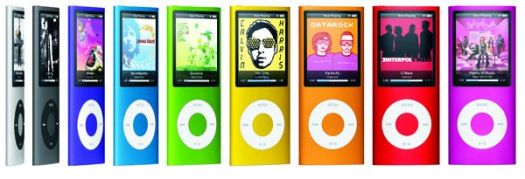
As the iPod family evolves, Apple has tried to offer something for everyone over the past seven years. The iPod nano line, named for its diminutive size, began almost as a hybrid of the now-defunct iPod mini, with its ample feature set and sleek vertical design, and the tiny-but-limited (i.e. screenless) iPod shuffle. But whereas the mini utilized a petite hard disk drive, the nano relies upon flash memory, which doubled in maximum storage capacity with its second generation, in addition to gaining an aluminum body and bringing more color options.
Last year's third generation nano represented a drastic redesign; shorter, squatter and heavier; but importantly incorporated video playback for the first time. And now the fourth generation returns to the long, slim shape while doubling the available capacity once again, this time to 16 gigabytes. But as Steve Jobs has led us to expect, new features set it apart as well.
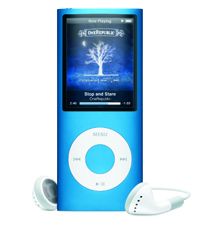
Within the iPod line, text-to-speech synthesis for spoken menus is unique to the nano, allowing listeners to hear the names of song titles, artists and other information. Apart from the obvious coolness, this has been a blessing to visually impaired music lovers. We need to opt into this feature, which works in conjunction with whichever operating system is running on our host computer. I'm using "Microsoft Sam," allegedly changeable in Windows Control Panel, although he's the only choice listed for XP, and it's that goes-with-everything, unemotional Stephen Hawking-type voice.
My Sammy reads just about everything though, making light work of Tchaikovsky and even The Art of Noise's "Paranormia," but when I played the science-fictiony "Battle in the Mutara Nebula" from the Star Trek II soundtrack, I was reminded of a comedian putting his hand over his mouth when he can't quite pronounce a foreign leader's name. It also read the album title as "Star Trek Aye-Aye" which is perhaps more appropriate by accident than intended.
Little Big Picture
The two-inch diagonal, 320x240 (at 204 pixels per inch) screen is only a half-inch shy of the much bulkier iPod classic, which I've stared at enjoyably for many an hour while traveling. This crisp LCD has adjustable contrast and backlight settings which make it easier to read in low light. An alternative large font can also make menus easier to read, while video subtitles and such are displayed using their own legible, high-contrast white-on-black font. Right out of the box, the presentation defaults to the zoomed-in mode (no black bars top and bottom), which is jim-dandy at this screen size and resolution. Aspect ratio purists can press Menu, jump back out to Settings then Fit to Screen - Off to zoom back out.
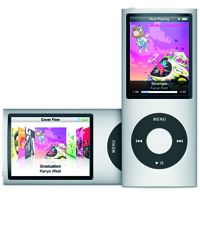
This new generation also gains a motion/position-sensing accelerometer, which pays off in two significant ways. When switching the player from left-handed to right-handed position, the video image automatically reorients itself so it's always (after a visible flip) correct-side up. Similarly, both landscape and portrait photos are always properly displayed. Motion-sensing is also the secret behind the new "Shake to Shuffle" feature, unique to the nano and not available on the iPod shuffle, go figure.
Shake to Shuffle uses a simple flick of the wrist to change the playback order of an album, a playlist, or the entire library: It's fast, it's intuitive, and best of all it doesn't require us to look at the player to take action. Its functionality has been extensively tested so that a jogger for example wouldn't trigger it with each step, and the tiny Hold switch up top disables the accelerometer and all its applications in addition to the click wheel.
Held vertically, the nano proffers the predominately text-based menus. Horizontal, it serves up the now-iconic Cover Flow entrée to our music. Pressing the center button calls up an abbreviated menu of key features, topped by Apple's new Genius Playlist. While the precise workings remain a closely guarded mystery, the results speak for themselves, as the nano can now build a grouping of 25 songs based upon the characteristics of one, and we have a custom mix in seconds. Best of all, even if we don't agree with Genius' taste, keep in mind that every song it's throwing at us comes from our own personal catalog, so we're assured a pretty good time, and never a bad tune in the bunch. We have to connect the nano to an iTunes account on a computer that has opted into Genius for it to work. When I connected mine, iTunes even knew that my nano review sample was purple, as evidenced by the little product avatar that appeared on my monitor.
Have Gigs, Will Travel
The player is so light, so thin, it unconsciously compelled me to treat it delicately, although the shell is actually made of a rigid single piece of extruded anodized aluminum with an iridescent finish that changes its shade in varying light. A solid block of curved glass covers the screen. I tried a Belkin Silicone Sleeve Case which added a thin, grippable layer of protection, but it denied me the gentle scrolling action of the click wheel. I've since switched to the Speck Products PixelSkin, bringing a tad more girth but also more security in the hand, owing to its square all-over grooves, with a handy cutout for the big dial. Voice recording is now possible on the nano, although no microphone is included. Apple has announced two new models of step-up headphones each with an integrated mic.
We can also take those multiple gigabytes of video, photos and music and patch into a home theater via optional the Apple Universal Dock combined with either the Apple Component AV Cable or the Apple Composite AV Cable, all sold independently.
Turn-Ons:
Turn-Offs:
Final Thoughts
We're in the fourth generation now so it's easy to lose sight of the understated marvel here. Although a different experience from the second-gen iPod touch, launched concurrently, the 4th generation iPod nano is a serious entertainer in its own right, somehow packing more functionality than ever into an impossibly slender device.
Available on Amazon.com:
Also Available on the Apple Store with Free Custom Engraving:
Manufacturer's Specifications:
Manufacturer's Contact Information
Apple
1 Infinite Loop
Cupertino, CA 95014
(800) MY-APPLE
On the Web at: www.apple.com
| Overall | |
|---|---|
| Value | |
| Performance | |
| Features/Ergonomics |


