One For All Kameleon 8 RF (URC 9964) Universal Remote Control Review
By Joe Lozito
Kameleon Blends In Yet Stands Out
A good universal remote is the holy grail of most home theaters enthusiasts. I, for one, have not yet found the one remote that allows me to control all my equipment without hitting a symphony of buttons. The
One For All Kameleon 8 RF 8-Device Universal Remote Control (aka the
URC 9964) provides a slick solution with a very easy setup but has some limitations which prevent it from being world-class.
If looks could thrill (and they can)
First off, right out of the gate, the Kameleon looks and feels fantastic. That dynamic blue screen, which comes on automatically via a vibration sensor (yes, it can be turned off, but who'd want to?!), is stunning. Its brightness is settable so it doesn't disrupt the darkness in your home theater. The buttons are well placed and clearly labeled and the remote fits perfectly in your hand. I can actually say that the Kameleon is ergonomically designed and mean it.
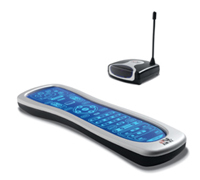
The Kameleon 8 RF has ergonomics to spare, and an IR/RF repeater so it works through walls.
The underside of the device has what the Web site touts as a "velvet-like bottom housing finish." Whatever you call it, it feels good to me. The remote balances well in the hand and you can get to all but the bottom-most buttons without having to adjust it. Sadly, there are some oft-used buttons at the bottom (such as "play" for example), but it doesn't take much adjusting to reach them.
The key to the Kameleon, though, is in that blue screen. It's a touch pad on which features are dynamically placed depending on the device you select. So, if you choose "Audio" you'll get your play/pause buttons, if you choose "TV" you'll get your channel-changers, and so forth. It's no mystery how the Kameleon works, at a profile you can see the bulges where the sensors are placed beneath the pad. Still, it works like a charm. And those "bulges" give the Kameleon a tactile nature that makes it easier to work with than some flat touchscreens.
Also, the makers at One For All made a fine decision in allowing you to "lock" the volume controls in place. So, if you're on DVD or TV or VCR, for example, you can always use your receiver's volume control. Nice work there.
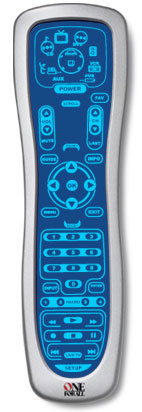
Dig that Blue Screen
Once I found my way around the remote, I started the sometimes Herculean task of programming it. Thankfully, I was in for a treat.
The first step is always the toughest
I'm a little ashamed to admit that it took me a minute to figure out how to get into SETUP mode. This was discouraging. You need to hold down the bottom SETUP key and wait for the top area to flash. For the life of me I couldn't get it to work. Then I realized you have to choose a device first (i.e., Cable, DVD, TV, etc) before you hit setup. I was in "Home Theater" mode and for some reason you can't get into SETUP from there. Okay, one hurdle down.
Once in SETUP mode, I went through programming the codes for my various devices. The Kameleon's included setup codes corresponded to my Onyko receiver and DVD player on the first try. The same was true for my Motorola cable box. Of course, those were the easy ones. Next, I had my projector, lights and curtains to contend with. Those proved to be a little more challenging.
Now where did I leave that Rosetta Stone?
There was no option for projectors in the Kameleon user's manual and, though it's possible to call the manufacturer and upgrade the remote via a telephone, my lack of land-line phone (cells won't work) excluded me from that option. So I began the process of teaching the Kameleon my projector's functions.
The Kameleon learns very easily in the typical hold-your-remotes-head-to-head-and-push-the-appropriate-button kinda way. However, since I had to use the "TV" device for my projector I had to fudge a few buttons. For example, my projector's remote has "Screen" and "Light" buttons which allow you, respectively, to adjust the aspect ratio and light intensity of the projected image. Since these buttons don't exist on the Kameleon's TV device pad, I had to assign those commands to "Format" and "Input." Ok, I guess I can remember that.
Things got a little more confounding when I started programming my lights and curtains, all of which use X10 remote devices. I was able to teach the Kameleon these functions in its "AUX" device pad. Of course, since AUX had no Light or Curtain functionality, I had to start getting creative. To give you an idea of how it worked out:
MENU = Curtain1
EXIT = Curtain2
GUIDE=Light1
INFO=Light2
Arrow-up=Open or On (in the case of curtains or lights)
Arrow-down=Close or off
Arrow-left=Dim
Arrow-right=Brighten
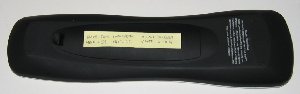
My Rosetta Post-it
On the bright side (pun intended), once the Kameleon learned the functions, it worked like a champ. On the other hand, since the Kameleon doesn't allow you to move or label any buttons, I needed to keep a Post-it handy to remember what button meant what feature. And forget about teaching this remote to friends. It's strictly for me.
Not a "FAV" of mine
One odd feature of the remote is that certain buttons cannot be programmed. I can understand "Power", "Setup" and "Home" being reserved for factory defaults. But for some reason, the Kameleon doesn't allow you to program "FAV", "SCROLL" or "VOD." I guess I can understand that, but unfortunately the FAV button is preset to automatically cycle through your favorite TV channels (the way SCAN works on some car radios). This is particularly annoying for me because I don't use FAV for that on my cable remote. Since I couldn't program the Kameleon's FAV button, I had to assign my cable's FAV function to a button called "REPLAY." Okay, add that to the Post-it.
Macro!…Polo!
Once I had all my functions programmed in, which took about an hour (not too bad in the world of universal remotes), it was time to start with the macros. The Kameleon allows you to program four macro buttons (M1-M4) and one "Master Home Theater" button (for turning your power on and off.
A major limitation of this remote is that it doesn't allow you to program a time interval between functions in a macro. This made the remote useless for my curtains. In order to write a macro for my curtains, I would need to program in a delay to wait for the curtain to open or close. Since I couldn't mess with the timing of the macros, I couldn't program one for the curtains.
The master home theater power button worked fine after a little re-programming to get it just right.
I think, therefore IR

The IR Extender Droid
The Kameleon comes with an IR/RF Base Station which allows you to extend the reach of your remote into other rooms for up to 100 feet. Since I'm in a small New York City apartment, I'm never more than 12 feet from an audio/video device at any given time (pity me), but I had to test this baby out just for fun. Sure enough, it worked like a charm.
The basic idea is: the base station works as a surrogate remote for you. You place it (unfortunately, it's one more thing to plug in) within line of sight of your equipment and it sends out IR signals to your devices. Then, you can leave the room and use the remote, which sends both IR and RF. When the RF reaches the base station, it sends the appropriate IR signal to your device. Voila! You're changing the volume from the bathroom or dimming the lights in the kitchen from the bedroom. Pretty darn cool.
So, to sum up:
Things I like about the Kameleon 8 RF:
- Vibrates out of sleep mode
- Quickly/easily programmable - setup codes worked instantly
- Learns very easily
- Feels great
- The IR/RF Base Station works like a champ
Things I don't like about the Kameleon 8 RF:
- Some buttons not programmable
- No ability to label/move buttons
- No settings for Home Theater accessories (such as lights or curtains)
- No defaults for projectors
- No PC interface, must upgrade via a land-line telephone
- No ability to control timing in Macros
Final Thoughts
I was pleasantly surprised by the ease-of-use that Kameleon URC 9960 afforded me, I was up-and-running in less than an hour, but the Kameleon has some limitations that keep it from being a robust solution for anyone with serious home theater needs. Still, it's a good solid remote that sets up in minutes and feels very natural in your hand. If you're looking for a universal remote and you don't have any unusual home theater needs, the Kameleon could be the one for you.
Where to Buy:
°
Kameleon 8 RF on Buy.com
°
Kameleon 8 RF on Amazon.com
Specifications:
- Dimensions (WxHxD): 2.66" x 9.22" x 0.98" (5.5cm x 23.5cm x 2.5cm)
- Weight (With Batteries): 7.0oz (198 grams)
- Weight (Without Batteries): 5.4oz (153 grams)
- Backlight: Blue Electroluminescent
- Buttons: 58; 40 Usable
- Memory: 2kb non-volatile
- IR Operating Distance: Approx. 30 feet (extendable)
- Batteries: 4xAAA (not included)
- Battery Life: 3 Months
- Warranty: 90 Days
- List Price: $129.99 USD (including RF module)
Company Information:
Universal Electronics Inc.
6101 Gateway Drive
Cypress, CA 90630-4841
Phone: 714.820.1000
Fax: 714.820.1010
Web sites:
°
Universal Electronics Web site
°
One For All Web site
°
OneForAllKameleon.com (Next Generation remotes)
°
OFAKameleon.com (Current Line including the 8 RF)


